
ESP8266 irrigation controller: seven valves, one buried pipe
I was tired of watching the garden go yellow every dry season. So I built an ESP8266 irrigation controller: a Wemos D1 mini in a box on the outside wall, seven valves on one buried pipe (five sprinklers, a master at the tap, a winter drain), all driven from my phone. A watchdog closes anything I forget, new firmware arrives over WiFi, and the laptop stays inside when it rains. Five years in, the grass is green.
One pipe instead of five
The controller was the cheap part. The expensive part of a sprinkler system is usually buried: a box of valves near the tap, and a separate pipe trenched out to every zone.
I skipped that. One master valve sits at the tap and one pipe loops around the garden. At each sprinkler, a clamp saddle taps the pipe (a fitting that bolts around it, no cutting), feeds a solenoid valve in a small box in the ground, and the valve feeds the head. The whole system, pipe included, came to about 80 euros in materials.
This also solves the pressure problem. Household water drives one sprinkler well and five badly, and the usual cure is a storage tank and a pump. Open one head at a time instead, and it always gets the full pressure of the line: watering becomes a sequence that can run as long as it likes.
The master valve is the safety net. The firmware opens it when a sprinkler asks for water and closes it when the last one shuts, so the buried pipe is only under pressure while something is watering. A valve that decides to weep at 2 a.m. leaks nothing.
The hardware
A Wemos D1 mini, an eight-channel relay board with seven channels in use, and 12 V solenoid valves. Power is a 30 W mains-to-12 V DC LED driver: the 12 V feeds the valves through the relays, and a small step-down module drops it to 5 V for the Wemos and the relay board. One box, one plug.
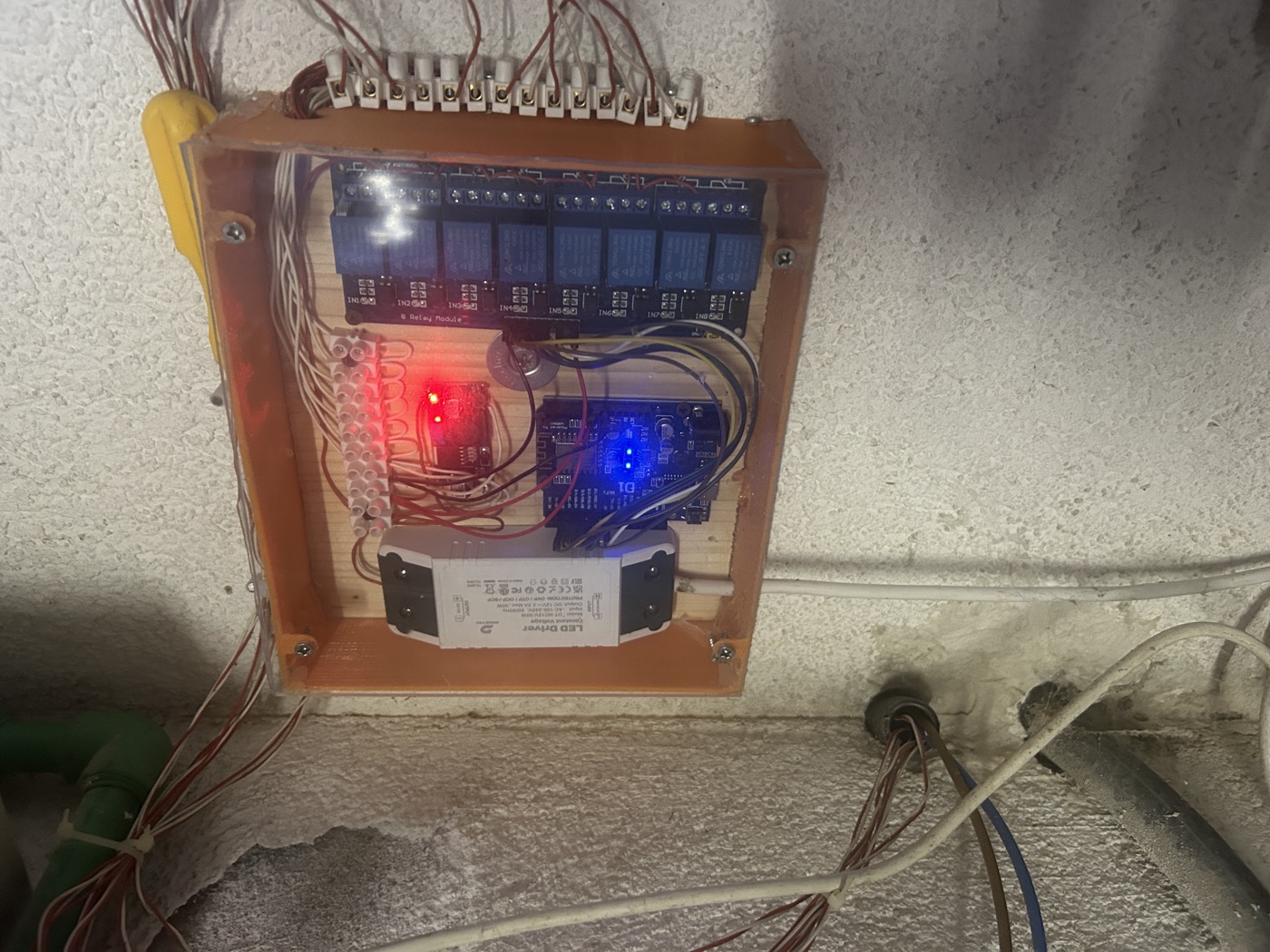
The box, five years in. The terminal strip at the edge is where the garden wiring comes in; the relay board drives the valves, the Wemos runs the show, and the white brick is the LED driver that powers everything.
The relays switch on LOW, and that is the first trap: while an ESP8266 boots, its pins float and the relays chatter until the sketch takes over. Park every pin closed before you make it an output:
digitalWrite(MASTER_PIN, HIGH);                  // first: park it closed
pinMode(MASTER_PIN, OUTPUT);                     // then: drive it
If you pick your own pins, skip GPIO 15: it must be low at boot, or the board will not start. And the master belongs on GPIO 0: the chip needs that pin high to boot, and high means closed, so the same pull-up that boots the board keeps the line dry through every reset.
Five buttons, one handler
In the app, the sprinklers are five buttons bound to V1 through V5, the numbered slots a Plynx button writes to. One default handler catches them all, and the master follows by itself:
void setSprinkler(uint8_t i, bool open) {
  openedAt[i] = open ? (millis() | 1) : 0;         // | 1: a stored time is never 0, and 0 means closed
  if (open) digitalWrite(MASTER_PIN, LOW);         // pressurize the line first
  digitalWrite(SPRINKLER_PIN[i], open ? LOW : HIGH);
  const bool master = anyOpen();
  if (!master) digitalWrite(MASTER_PIN, HIGH);     // last one out cuts the water
  Plynx.virtualWrite(1 + i, open ? 1 : 0);
  Plynx.virtualWrite(MASTER_V, master ? 1 : 0);
}

PLYNX_WRITE_DEFAULT() {
  const uint8_t v = request.pin;
  if (v >= 1 && v <= SPRINKLERS) {
    setSprinkler(v - 1, param.asInt());            // V1..V5
  } else if (v == MASTER_V) {
    Plynx.virtualWrite(MASTER_V, anyOpen() ? 1 : 0);  // not yours to press
  }
}
The virtualWrite calls keep the phone honest: when the board closes a valve
on its own, the button goes back up on its own. And the master is
deliberately not a button: it reports its state on V7, and if you press V7
anyway, the board writes the real state back.
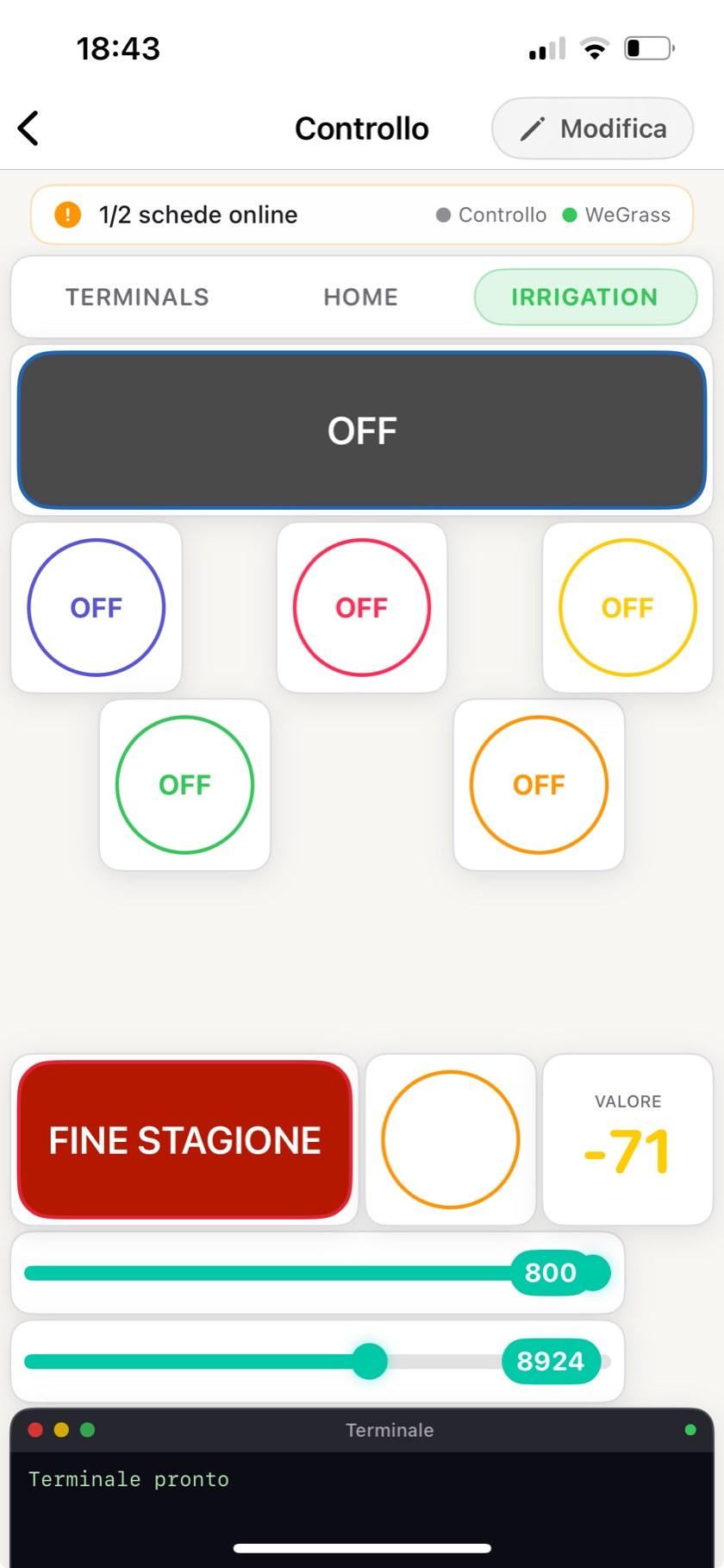
The dashboard, straight off my phone, labels half in Italian because the garden is. A round button per sprinkler; the dark bar is the master, which the app can watch but not switch; the red end-of-season button opens the drain; the sliders set the auto-shutoff timeouts; the −71 is WiFi signal out at the wall box.
Nothing opens without a deadline
A sprinkler left running is not a bug report, it is a water bill. So a one-second timer walks the valves, closes anything that has run past its limit, and says so:
void watchdog() {
  for (uint8_t i = 0; i < SPRINKLERS; i++) {
    if (openedAt[i] && millis() - openedAt[i] > MAX_RUN_MS) {
      setSprinkler(i, false);
      Plynx.notify(String("Sprinkler ") + (i + 1) + " ran past its limit, closed it");
    }
  }
}
Plynx.notify pushes the message to the phone through the Notification
widget, so it arrives whether or not the app is open. One detail worth copying: check
elapsed time as a subtraction, millis() - openedAt[i], which still works
when the millisecond counter rolls over after 49 days. And that | 1 back
in setSprinkler is its quiet partner: it keeps a valve opened at the
exact instant the counter reads zero from being mistaken for a closed one.
After a power cut
The board reboots with every valve closed, while the phone still shows yesterday. There are two ways to reconcile: ask the server what the buttons say, or tell it what the valves are. For lights, asking is fine. For water, tell: replaying an ON saved before the outage would open a valve with nobody home. So on every reconnect the board declares what it knows:
PLYNX_CONNECTED() {
  for (uint8_t i = 0; i < SPRINKLERS; i++) {
    Plynx.virtualWrite(1 + i, openedAt[i] ? 1 : 0);
  }
  Plynx.virtualWrite(MASTER_V, anyOpen() ? 1 : 0);
}
Updating it without going outside
A button on V50 tells the board to fetch a new firmware over WiFi and reboot into it:
PLYNX_WRITE(V50) {
  if (!param.asInt()) return;
  Plynx.virtualWrite(50, 0);                       // let the button pop back up

  WiFiClient client;
  ESPhttpUpdate.rebootOnUpdate(true);
  t_httpUpdate_return r = ESPhttpUpdate.update(client,
      "http://files.example.com/wegrass/update", FW_VERSION);

  if (r == HTTP_UPDATE_FAILED) {
    Plynx.notify(String("Update failed: ") + ESPhttpUpdate.getLastErrorString());
  }
}
The current version travels with the request, so the server can answer “nothing new” and the board carries on untouched. Two warnings, both earned. The ESP8266 keeps no fallback copy: a new firmware that boots but is broken cannot roll itself back, and your way in is the USB cable you were trying to retire. Flash a board on the desk before you point the wall box at a new binary. And whoever serves that file owns the board, so keep the update URL on your own network, or use HTTPS.
The whole sketch
Everything above, assembled. This is not my production sketch (that one has grown the drain valve, adjustable run times, WiFi provisioning and a maintenance terminal), but it is the shape of it, and it compiles and runs as-is on a Wemos D1 mini:
#define PLYNX_PRINT Serial

#include <ESP8266WiFi.h>
#include <PlynxSimpleEsp8266.h>
#include <ESP8266httpUpdate.h>

#define FW_VERSION "1.4.0"

char auth[] = "YourAuthToken";
char ssid[] = "YourNetwork";
char pass[] = "YourPassword";

// One relay per sprinkler, plus the master valve at the tap.
// Buttons V1..V5 in the app map to SPRINKLER_PIN[0..4].
const uint8_t SPRINKLER_PIN[] = { 16, 5, 4, 14, 12 };
const uint8_t SPRINKLERS      = sizeof(SPRINKLER_PIN);
const uint8_t MASTER_PIN      = 0;
const uint8_t MASTER_V        = 7;   // state only: the app watches, never writes

const uint32_t MAX_RUN_MS = 10UL * 60UL * 1000UL;
uint32_t openedAt[SPRINKLERS] = { 0 };

PlynxTimer timer;

bool anyOpen() {
  for (uint8_t i = 0; i < SPRINKLERS; i++)
    if (openedAt[i]) return true;
  return false;
}

void setSprinkler(uint8_t i, bool open) {
  openedAt[i] = open ? (millis() | 1) : 0;         // | 1: a stored time is never 0, and 0 means closed
  if (open) digitalWrite(MASTER_PIN, LOW);         // pressurize the line first
  digitalWrite(SPRINKLER_PIN[i], open ? LOW : HIGH);
  const bool master = anyOpen();
  if (!master) digitalWrite(MASTER_PIN, HIGH);     // last one out cuts the water
  Plynx.virtualWrite(1 + i, open ? 1 : 0);
  Plynx.virtualWrite(MASTER_V, master ? 1 : 0);
}

PLYNX_WRITE_DEFAULT() {
  const uint8_t v = request.pin;
  if (v >= 1 && v <= SPRINKLERS) {
    setSprinkler(v - 1, param.asInt());            // V1..V5
  } else if (v == MASTER_V) {
    Plynx.virtualWrite(MASTER_V, anyOpen() ? 1 : 0);  // not yours to press
  }
}

void watchdog() {
  for (uint8_t i = 0; i < SPRINKLERS; i++) {
    if (openedAt[i] && millis() - openedAt[i] > MAX_RUN_MS) {
      setSprinkler(i, false);
      Plynx.notify(String("Sprinkler ") + (i + 1) + " ran past its limit, closed it");
    }
  }
}

PLYNX_CONNECTED() {
  for (uint8_t i = 0; i < SPRINKLERS; i++) {
    Plynx.virtualWrite(1 + i, openedAt[i] ? 1 : 0);
  }
  Plynx.virtualWrite(MASTER_V, anyOpen() ? 1 : 0);
}

PLYNX_WRITE(V50) {
  if (!param.asInt()) return;
  Plynx.virtualWrite(50, 0);                       // let the button pop back up

  WiFiClient client;
  ESPhttpUpdate.rebootOnUpdate(true);
  t_httpUpdate_return r = ESPhttpUpdate.update(client,
      "http://files.example.com/wegrass/update", FW_VERSION);

  if (r == HTTP_UPDATE_FAILED) {
    Plynx.notify(String("Update failed: ") + ESPhttpUpdate.getLastErrorString());
  }
}

void setup() {
  Serial.begin(115200);

  digitalWrite(MASTER_PIN, HIGH);                  // first: park it closed
  pinMode(MASTER_PIN, OUTPUT);                     // then: drive it
  for (uint8_t i = 0; i < SPRINKLERS; i++) {
    digitalWrite(SPRINKLER_PIN[i], HIGH);
    pinMode(SPRINKLER_PIN[i], OUTPUT);
  }

  Plynx.begin(auth, ssid, pass);
  timer.setInterval(1000L, watchdog);
}

void loop() {
  Plynx.run();
  timer.run();
}
Where to take it next
The sketch already knows everything worth logging: openedAt marks when a
valve opened, so the moment it closes you know how long it ran. Add up those
seconds per zone, push the totals to V11 through V15 with virtualWrite,
and a Chart widget turns a season of watering into a
graph. The zone that drinks the most becomes obvious, and a total that jumps
when nothing changed is how a cracked pipe announces itself.
Scheduling needs no code at all. The Automation widget switches a pin at a set time, with weekday and sunrise or sunset offsets, and the server runs the schedule, so morning watering happens with the phone off. Point one at each sprinkler’s pin, stagger the start times so the heads run one at a time, and the watchdog stays underneath as the safety net. One caveat, and it is the same trade-off as the reconnect policy: if the board is offline when a start time passes, that run is skipped. Water errs closed.
The handlers do not care who calls them, either: a soil moisture sensor on the analog pin, read in the same one-second timer, can veto a scheduled run after rain by closing whatever the schedule opened.
If you build one
Start with two sprinklers, not five: the trench is the slow part, and the
code does not care how long SPRINKLER_PIN is. And put the auto-shutoff in
on day one, before the first time you leave the house with a valve open.
That is the feature you are actually building. The rest is convenience.