
ESP32 OTA updates from a browser: compile, push, roll back
The board is on a roof, in a greenhouse, behind a wall panel. You need to change one line. Until now that meant a laptop, a USB cable and a ladder.
Plynx 1.2.4, released on 18 August 2026, closes that loop. Pair the board once, write the sketch in a browser on any computer, press Upload, and the board flashes itself over Wi-Fi. It is free, and it works on ESP32 and ESP8266.
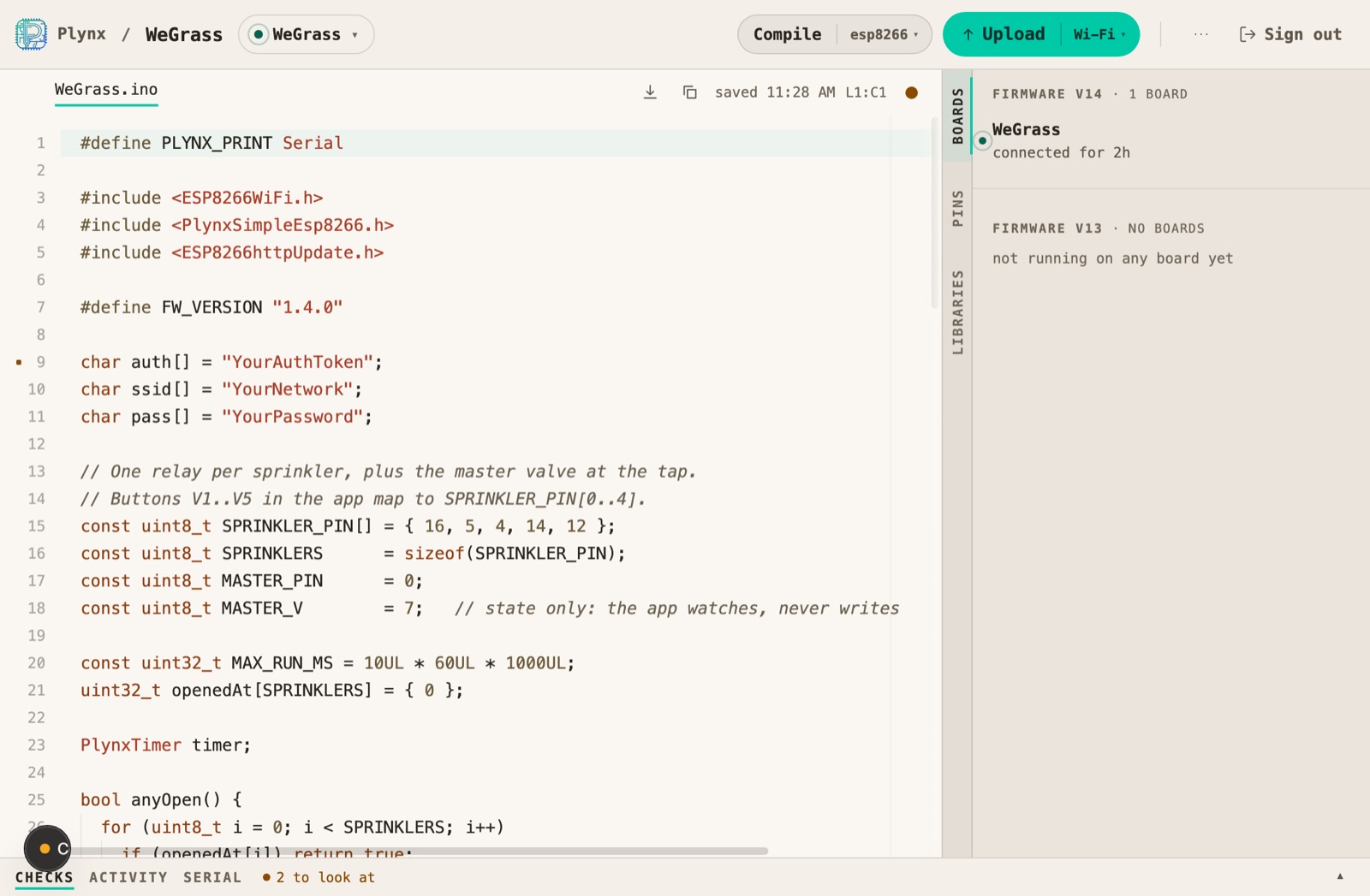
The editor with a real project open. Compile target on the left of the Upload button, paired boards and firmware versions on the right.
Pair with a QR code, edit, compile on the server, push to the board. No cable.
The flow, end to end
- Pair. Open editor.plynx.cc, scan the QR code from the Plynx app. Your project and its sketch appear in the browser.
- Write. Use a real keyboard, syntax highlighting and your board’s pin map in the side panel.
- Compile. The build runs on the server, not on your machine. Nothing to install on your computer.
- Upload. The binary goes to the board over Wi-Fi.
Measured against the production server on 18 August 2026, with a sketch of about a hundred lines: 9.2 seconds to compile for ESP8266, 34.5 seconds for ESP32. The ESP8266 binary that came out, 298 KB, uploaded in 3.2 seconds, and the push to the board took under a second. Compiling is the slow part because it is a real Arduino build, not a syntax check. The same sketch built for ESP32 is around 900 KB.
What the sketch needs: nothing
This is the part people expect to be hard. There is no OTA code to add,
no second sketch and no ArduinoOTA.begin(). Install the Plynx library
1.0.5 or later from the Arduino Library Manager and the handler is already
in the build: the ESP32 and ESP8266 headers include it at the bottom of the
file.
A complete sketch that can be updated over the air looks like this, and the only thing it does is switch an LED:
#define PLYNX_PRINT Serial

#include <WiFi.h>
#include <PlynxSimpleEsp32.h>

char auth[] = "YourAuthToken";
char ssid[] = "YourNetwork";
char pass[] = "YourPassword";

PLYNX_WRITE(V0) {
  digitalWrite(2, param.asInt());
}

void setup() {
  Serial.begin(115200);
  pinMode(2, OUTPUT);
  Plynx.begin(auth, ssid, pass);
}

void loop() {
  Plynx.run();
}
Flash that once over USB. Every version after it arrives over the air.
One thing to check on ESP32, because it fails silently: keep a partition scheme that has two app slots, which is the default. A “No OTA” or “Huge APP” scheme compiles perfectly and leaves the board with nowhere to put an update.
When the update is bad
Any OTA article that skips this part is selling something. A firmware you cannot reach is worse than a firmware you have to walk to.
On ESP32 the new firmware has to check in. Before rebooting into the new image the library writes a pending flag. The image has 60 seconds to check in with the server; if it does not, the board rolls back to the previous firmware and restarts. Three unconfirmed boots and it gives up on the new image for good.
Know the edge of that guarantee, because it decides whether you need the
ladder: the watchdog runs inside the Plynx loop. It covers the common
disaster, a firmware that boots and runs but can no longer reach the
network. It does not cover a firmware that crashes or hangs before
Plynx.run() is ever reached. That one needs the cable.
On ESP8266 there is no automatic rollback, and there cannot be. The 8266 updater is single slot: at boot the new image is copied over the old one, so once a broken-but-booting firmware is installed, nothing on the chip can undo it. What the library does is refuse to start the update when there is not enough free sketch space. Test ESP8266 builds on a board on your desk before you send one to a board you cannot reach.
Versions, and a board to try them on
The editor is not a text box with an Upload button. Every binary you upload becomes a version, with its size, its SHA256, and a note you write when you upload it.
Versions live on a line, and boards follow a line. That gives you a workflow:
- Tick one test board and upload only to it. Mark it as your test board and it goes first when a version is promoted.
- If it survives, promote the version and every board in the project that follows the line gets it, skipping any whose chip or free space does not fit.
- Delete old versions to free space. There are guardrails: a version a board is running, or waiting for, or the last one left on a line, stays where it is.
A board that is offline is not a problem. The update waits and goes out when the board reconnects. I tried exactly this against production today: the push answered with a conflict rather than a false success, and a message that says the thing you want to read, that the update stays pending and is sent automatically when the board reconnects.
Questions people ask
Do I still need a USB cable?
Once, for the first flash. After that the cable is for power.
Does it work on ESP8266 too?
Yes, with one difference that matters: no automatic rollback. See above.
What if I flash something broken?
On ESP32, if it still runs the library it reverts by itself after 60 seconds. If it crashes earlier, or if it is an ESP8266, you walk to the board.
Can I press Upload while the board is offline?
Yes. The update waits and goes out when the board reconnects.
What does it cost?
Nothing. There is no paid tier and no subscription.
Does it work with a self-hosted server?
Not yet. The web editor and the firmware versions run on Plynx Cloud. A self-hosted server runs your dashboards and boards, without the editor.
Try it
Install Plynx from the App Store, add the library from the Arduino Library Manager, flash a board once, then open editor.plynx.cc and pair it. The getting started guide walks the first project. If you want to see what people build with this, the irrigation controller has been running a garden for five years.
The next change does not need a cable.